Synthmas — overview
Synthea is an open-source synthetic patient generator from MITRE. Synthmas is the dataset that comes out when you run Synthea against the population of Massachusetts — synthetic patients with synthetic encounters, conditions, observations, medications, devices, and so on. No real-patient data is involved, which makes it the ideal demonstration corpus for the engine.
The Synthmas extract used in this walkthrough ships as a directory of CSV files — one per source table — which is exactly what the engine's CSV driver consumes.
Get the bundle
The Synthmas CSV + Rabbit-in-a-Hat bundle is a free download
from rook-it.com/downloads —
a single archive with the source CSVs, the single-RiaH file used
in this walkthrough, and a working etl.conf. No login required
for the latest version. With the
Free tier and no licence file, you can
have a populated CDM out of the box and follow this guide
step-by-step against your own running engine.
Already have an engine install? Grab the overlay tarball
synthmas-single-RiaH-1.0.21.tar.gz
instead — the RiaH, Usagi maps, and etl.conf only (no CSVs).
Overlay it onto the engine artefact with
tar xzf synthmas-single-RiaH-1.0.21.tar.gz --strip-components=1,
then fetch the source CSVs with bin/setup-synthmas.sh.
Source schema
The relevant source tables for this walkthrough:
| Source file | Description |
|---|---|
patients.csv |
One row per patient — id, dob, gender, race, address. |
organizations.csv |
Provider organisations — also addresses. |
providers.csv |
Individual providers — addresses again. |
encounters.csv |
Visits between patients and providers. |
conditions.csv |
Conditions diagnosed during encounters. |
procedures.csv |
Procedures performed during encounters. |
observations.csv |
Observations recorded during encounters, with units. |
medications.csv |
Drug exposures. |
devices.csv |
Devices issued to patients, with UDI codes. |
payers.csv |
Insurance organisations — one row per payer, with a name column used as the source code in the payers Usagi map. |
payer_transitions.csv |
One row per (patient, payer, year-range) — the input that drives payer_plan_period. |
Target CDM
The walkthrough populates a representative slice of the OMOP CDM — twelve real CDM tables plus three that are derived rather than read directly from any single source:
| CDM table | Notes |
|---|---|
location |
Addresses extracted from several source tables. Forces normalisation. |
person |
One row per patient. |
care_site |
Provider sites. |
provider |
Individual providers. |
visit_occurrence |
Encounters → visits. |
visit_detail |
Sub-visits within an encounter. |
condition_occurrence |
Diagnoses with SNOMED-coded concepts. |
procedure_occurrence |
Procedures with SNOMED codes. |
observation |
Observations with mode-dispatch into value_as_number / value_as_string. |
measurement |
Numeric measurements with LOINC vocabulary lookups. |
drug_exposure |
Medications, with a date-arithmetic pattern for the end date and UDI parsing. |
device_exposure |
Devices with a fixed-interval end date and UDI parsing. |
death |
Derived — built from a LeftJoin of patients with conditions. |
observation_period |
Derived — observation windows tied back to person. |
payer_plan_period |
Derived — driven by payer_transitions.csv, LeftJoin-ed against payers.csv for the payer name; payer concept id via Usagi map. |
The target database in this walkthrough is PostgreSQL, with the
CDM tables in the omop_cdm schema.
Mapping plan
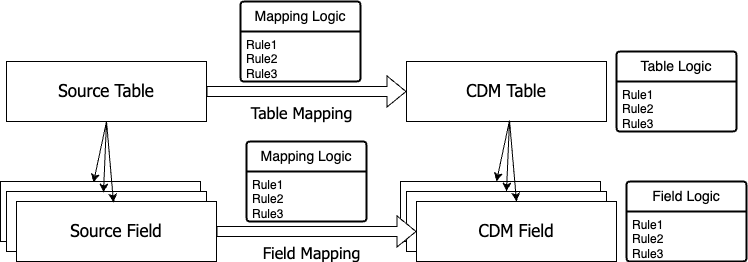
A mapping plan starts in Rabbit-in-a-Hat:
- Draw the source-to-CDM table arrows for the tables you intend to populate. The simple cases (one source → one CDM) need no rule at all.
- Draw the field-to-field arrows where source and CDM types match.
- Add a
logic:rule on a CDM field where a transformation is needed (type cast, padding, vocabulary lookup, …). - Add a
logic:rule on a CDM table where a table-level operation is needed (Normalize,DependOn,Join,LeftJoin).
Walkthrough order
The pages below build up techniques by introducing one or two new patterns each:
- The location table —
Normalize, type mismatches, padding, defensiveTruncate, hard-coded fields. The warm-up. - The person table — vocabulary maps with default
- assert, date deconstruction, ID generation, cross-table lookups.
- Clinical events —
visit_occurrence,condition_occurrence,procedure_occurrence.Selectorbased on a class field; pre-map +VocabMapfor codes that aren't in the standard vocabulary; the universaltype_concept_idpattern. - Values and dates —
observation,measurement,drug_exposure,device_exposure. Mode-dispatch on:type, date arithmetic for end dates, UDI regex parsing, null fallback withSelector. - Derived tables —
death,observation_period,payer_plan_period.LeftJointo derive a CDM table from two source tables (twice —deathjoins on a shared date,payer_plan_periodjoins a fact table against a lookup); cross-CDM foreign keys withGetCDMTableId(@person) + AssertNot(NULL). - Useful patterns — vocabulary lookups, Usagi maps, conditional chaining: the toolkit you'll reach for over and over.
- FAQ — questions that come up the first time you watch
run.log(record counter past 150,000, throughput swings, queue labels, unmapped concept ids).
How to follow along
If you want to run the example yourself:
- Get the Synthmas bundle (or
generate your own with
synthea -p 50 Massachusetts). - Drop the CSVs into
etc/etl-engine.d/db/of the engine artefact — see Folder Layout. - The bundled Rabbit-in-a-Hat file goes alongside
etl.conf. - Run
bin/run-etl-engine.shand watchlogs/<table>.logfor the results.