Folder Layout
Unzipping etl-engine-X.Y.Z.tar.gz creates the directory structure
below. The engine expects this layout — keep the names intact and the
shipped scripts will work without configuration changes.
bin/install-etl-engine.sh    # Loads the Docker image
bin/run-etl-engine.sh        # Runs the engine container

data/etl-engine.docker       # Docker image bundled with this release

etc/etl-engine/etl.conf      # The engine configuration file
etc/etl-engine/              # Drop the Rabbit-in-a-Hat file here too

etc/etl-engine.d/db          # CSV source files (when source driver is "csv")
etc/etl-engine.d/usagi       # Usagi mapping files
etc/etl-engine.d/vocab       # Athena vocabulary zips (input to "populate
                             # vocabulary" automation)
etc/etl-engine.d/vocab.backup # Where processed Athena zips are moved
etc/etl-engine.d/indexes     # Persisted indexes and sequences from
                             # StoreIndexMap / StoreSequence

logs/                        # Log files written by the engine
                             # (cleared at the start of every run)

licenses/                    # Open-source library licenses

claude-skill/etl-engine.md   # Claude Code skill — pair with a local
                             # AI assistant for engine-specific help
The claude-skill/ directory
The shipped claude-skill/etl-engine.md is a Claude Code skill — a
single Markdown file packaging engine expertise (rule names, log
shapes, configuration keys, debugging walkthroughs) for use by a
local AI assistant on the system running the engine. See
AI assistants for installation.
The rest of the documentation lives online at
docs.rook-it.com/etl-engine — not bundled with the release, so
the documentation can iterate faster than the engine binary. If you
need an offline copy of the full site, mirror it locally with
wget --mirror or equivalent.
Inputs into the engine
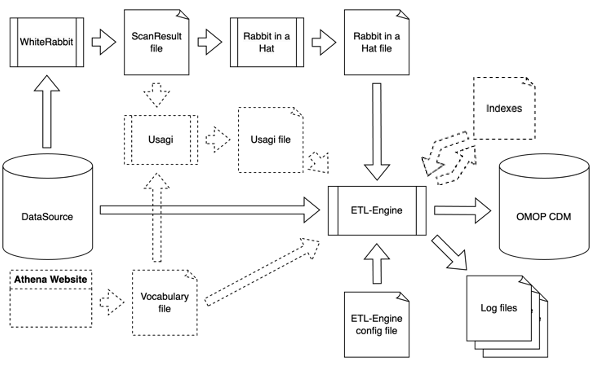
A typical run combines several artefacts:
- Source database — CSV files in
etc/etl-engine.d/db/, or a connection string to a supported RDBMS (MariaDB / MySQL, PostgreSQL, or SQL Server) configured inetl.conf. - OMOP CDM vocabulary — loaded into the destination database. The
engine can load it from an Athena zip
via the
automation.pre.populate vocabularysetting. - Usagi files — CSV files used by the
UsagiMaprule, stored underetc/etl-engine.d/usagi/. - Rabbit-in-a-Hat file — a gzipped JSON file describing the
source-to-CDM mapping, stored alongside
etl.conf.
Container view of the same paths
The run script mounts the host directories into the container as follows:
| Host | Container |
|---|---|
etc/etl-engine/ |
/etc/etl-engine (read-only) |
etc/etl-engine.d/ |
/etc/etl-engine.d (read-write) |
logs/ |
/var/log/etl-engine (read-write) |
The shipped etl.conf references the container paths
(/etc/etl-engine.d/db/, /var/log/etl-engine/, …), which is what
you'll see in error messages and log output.
Splitting an ETL across multiple Rabbit-in-a-Hat files
A single ETL does not need to live in one Rabbit-in-a-Hat file. When
you split it, the engine can persist indexes and global sequences from
one run so the next can pick them up — the typical case is when the
first run populates the person table with new IDs, and a later run
populates visit_occurrence and needs to map source person IDs back
to the CDM person_id it already issued.
Use the StoreIndexMap
and StoreSequence table
rules in the first run; the same indexes are loaded automatically in
subsequent runs from etc/etl-engine.d/indexes/.